

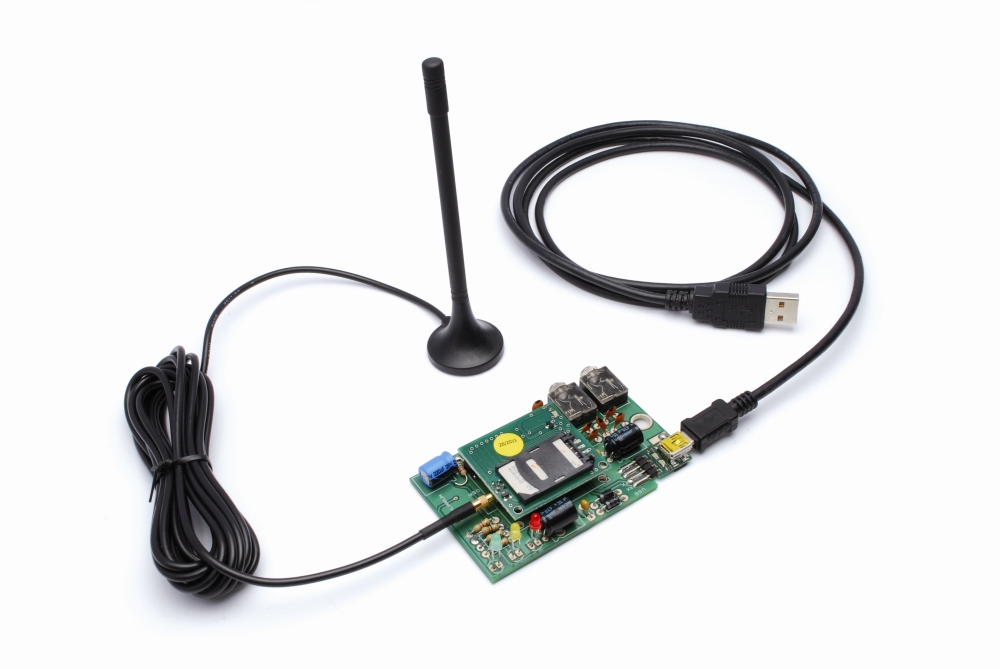
Allows you to create data connections on the GSM network through a standard USB interface.
The cellular modems, particularly USB-stick ones, are now at very affordable prices, however they’re limited: they are explicitly designed for Internet connections, so you cannot use it as a normal modem and so implement, for example, a point to point data communications with them. The GSM modems that allow this are quite rare, and so we create and offer you one: it is a device for PC with an USB interface with “voice” functions: there is a jack for a speaker and one for microphone.
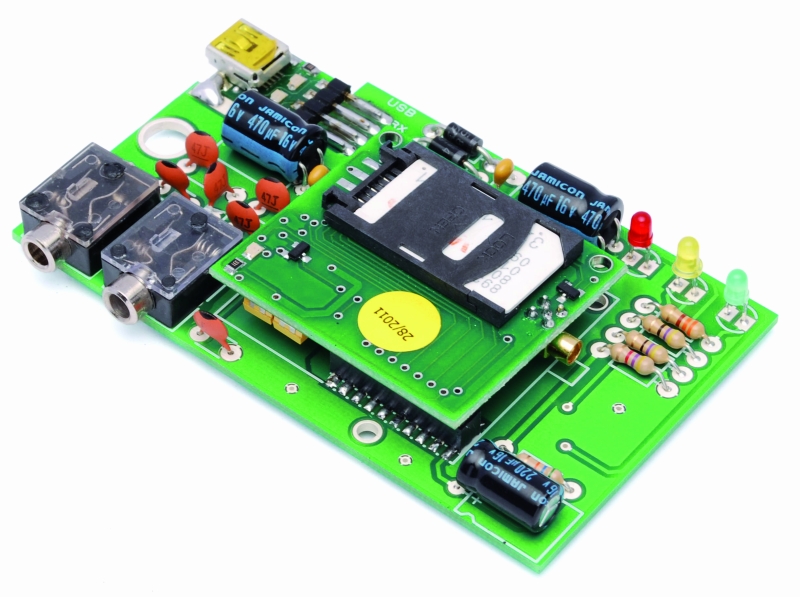
The circuit is made simple by the adoption of a mobile phone module of Simcom SIM908 and SIM900 of the SIMCom. The USB connection is implemented with the aid of a converter TTL / USB type FT782M. Our modem is ideal to perform data links without access to the GPRS network or in any case to the Internet and allows, for example, the use in point-to-point mode, locators GPS / GSM or GSM only so as to obtain instantly data positioning and follow moves on live. In short, it allows direct data connection with another modem or mobile phone provided of a modem, but without going through the web: connections are made directly to the GSM data channel.

Wiring diagram
The circuit consists in a Simcom module and a few discrete active and passive electronic components; the conversion interface from TTL to USB is a small module that applies to USB contacts and connects to RX and TX cell module.

The connector carries power supply (Vcc, contacts 17 and 19 – GND, contacts 18 and 20) in addition to the power-on signal (PWR), and all signals and serial communication lines to and from the GSM module.

The ON/OFF line is connected to a R/C circuit that, at power of the entire circuit, considering that C11 is discharged puts it to hte logical zero; this condition leaves the transistor T2 of the mobile phone module interdict and maintains logical 1 to the PWR Contact of the SIM900/SIM908. When the capacitor is charged enough to saturate the T2 transistor, these places at the bottom level the PWR line of the GSM and turn on the mobile phone.

There are two contacts for the microphone (differential input) and two contacts for the speaker: pins 19, 20, 21, 22, which correspond respectively to MIC1P and MIC1N (positive and negative) and SPK1N and SPK1P (respectively negative and positive of the speaker).
The antenna of the GSM module is connected directly on the PCB of the cell on a special type of miniature coaxial MMCX connector.

The main power is provided by the 5 volts coming from USB, the absorption of the mobile phone module does not exceed the granted limit (500 mA) from this type of connection.
C1 and C2 filter the voltage and D1 and D2 subtract about 1.4 volts, because SIM900/SIM908 work with a maximum of 4 volts, filtered by C3 and C4 to reduce noise (note the resistor R1, which discharges such capacitor when the circuit is private of supply).
Light emitting diodes LD1 and LD2 are used to monitor data traffic, respectively, received on the RX line and sent from the TX.
Bill of materials
[code]
R1: 330 ohm
R2: 47 ohm
R3: 47 ohm
R4: 4,7 kohm
R7: 56 kohm
C1: 100 nF
C2: 470 µF 16 VL
C3: 100 nF
C4: 470 µF 16 VL
C5: 47 pF
C6: 47 pF
C7: 47 pF
C8: 47 pF
C9: 47 pF
C10: 47 pF
C11: 220 µF 16 VL
D1: 1N5819
D2: 1N4007
LD1: LED 3 mm red
LD2: LED 3 mm yellow
LD3: LED 3 mm green
USB: TTL/USB (FT782M)
female strip 2×10 via 2 mm
Jack 3,5mm (2 pz.)
[/code]
Use of the modem
To use our modem first must install a virtual serial port loading on the computer FT232RL drivers, downloadable for free from www.ftdichip.com .Once the drivers are installed, connect the modem, with USB/mini-USB cable, and wait while it is found and the drivers are actually installed.
After that, you can already use the product by opening a terminal window (Windows Hyper Terminal is fine …) you can handle the modem by issuing the AT commands for the SIM900/SIM908.

The communication session from a terminal must be opened on the virtual COM assigned by the operating system with the following parameters: speed 115.200 bps, 8 data bits, 1 stop bit, no parity, hardware flow control disabled.

After starting the communication session with Hyper Terminal, the screen shows all the time diagnostic information and other data coming from the SIM900/SIM908 modem; into the screen you can give appropriate commands, perhaps starting with a reset (ATZ). You can also do a simple test first, giving the command ATD NNNNNNNNN where NNNNNNNNN is the number to dial, putting the number of mobile phone with a modem and pressing Enter, you will see soon the phone’s display the incoming data message.If you give the command ATD NNNNNNNNN followed by ; the call will be on a normal mode (vocals) and the called phone display will show only the incoming call alert.

[…] out a serial connection on these devices. The people at Open Electronics decided to build their own small serial-enabled cell phone modem, a boon to someone wanting a serial connection to any place with a cell […]
[…] out a serial connection on these devices. The people at Open Electronics decided to build their own small serial-enabled cell phone modem, a boon to someone wanting a serial connection to any place with a cell […]
[…] this GSM/GPRS & GPS modem along SIM900/SIM908 module free-electronics.org make this electronics projects and designs electronic circuits : A modem GSM & GPRS among SIM900 or SIM908 module. Admits you to compose information unions on the GSM system ended a common USB interface. The cellular modems, particularly USB-cane persons, are present at same inexpensive charges, nevertheless they’re narrow: they are explicitly created for Internet continuitys, so you cannot exercise it as a usual modem and so utensil, for instance, a degree to allude material transmissions along them. The GSM modems that approve this are entirely scarce, and so we compose and tender you digit: it is a thingamajig for PC among an USB interface along “voice” occasions: there is a jack for a talker and alone for microphone. GSM/GPRS & GPS modem accompanying SIM900/SIM908 module – read more about this project detail […]
Dear Sir/madam
We’re a software development company from iran
and we plan to develop arealtime positioning system
using personal GPS trackers.
Please inform us if your personal tracker devices
support GPRS communication , and if so,we appreciate
your contribution on providing us with the necessary
technical information or documentation.
Best regards
Mostafa Ghassemi
Dear Mostafa, My name is Hassan.
We usually do projects related to GPS tracking and remote monitoring using GPRS.
My skype ID is : hassanshirazi53
Please connect with me for more information
Hi,
our system uses the SimCom modules:
http://wm.sim.com/producten.aspx?id=1019
http://wm.sim.com/producten.aspx?id=1024
This modules have teh GPRS functions
Hi, I’m trying to connect two computers using GSM to establish a data call for serial data transmission. I’m also using SIM900 module on a shield, connected to the computers using FTDI cable.
When I try to initiate a data call it says “No Carrier” but when I initiate a voice call it connects easily. I can even send sms without any problems.
Do I need to change any settings in the module for the data call?
Regards
To do a Data call you have to write :
ATD 3452454658
without ;
If you write
ATD 3452454658;
you make a voice call.
Also you ave to wait the phrase CONNECTED 9600 (if I remember correctly :-/ )
hey Boris!
I tried that, with a semi-colon, it makes a voice call but without one, it just replies “No Carrier”.
Did you change any other setting for the SIM900 module?
Could it be because of the SIM Card? Is the one you are using a normal SIM card? Did you activate any special plans/settings from your service provider?
Thanks & regards,
Hi Boris !
I’m also using SIM900 module to design a gsm/gprs modem.
The power supply is from USB (5V-500mA),as your circuit on this site,i use 2 Diots 1n5819 and 1n4007 to get 4V output.
Now is the problem :
+When power plugs in,power led is bright,status led is bright,netlight led is blink fast…but after 10 seconds,netlight led turns to be black and it continues blinking fast,status led is too,i understand it’s now in reset mode because it cant find any phone networks.I’ve checked my schematic and no problem can be found,so maybe the problem is current.
+Sim900 need 2000mA to active GSM mode,but USB current ‘s just 500mA so i think that’s problem ?
Can you explain my problem ? Any solution for that ?
Thanks !
Please read data sheet. it is clearly specify that
When the input is from the USB port of a computer, the average current is 500mA according to
the USB specification, so a super capacitor must be added near the module VBAT pins to
compensate the peak current in transmit burst. A low ESR tantalum capacitor is usually used. The
value for the capacitor should be not less than 470uF.
Hi, I’m using some big capacitor to give the right current. The USB give no more 500mA but the capacitors control the spike.
Can you take off the USB adapter and use serial directly?
You have to power the circuit with 5V and use a MAX232 to adapt the level
You have to use a RS233/TTL converter, like the MAX232
My notes for others:
Link to product: http://store.open-electronics.org/GSM_GPRS_GPS_modem
Need to buy small breakout for SIM900 GSM module (or other), USB to serial converter and antenna. (all on the shop)
I received instructions in Italian. The USB to Serial sheet points to selecting 5V or 3.3V for the TX/RX lines. I found it worked with 5V which as shown in the diagram on the supplied (italian) instruction was the centre and left connections to bridge.
I found the “modem” capability this circuit provides is provided by the GSM chip and is Circuit Switched Data http://en.wikipedia.org/wiki/Circuit_Switched_Data
so you should CHECK YOUR OPERATOR supports this before buying.
CSD is not always supported and often requires activation. Although wikipedia says otherwise, I believe CSD will be phased out over the coming years.
http://www.cooking-hacks.com/index.php/documentation/tutorials/arduino-gprs-gsm-quadband-sim900 is a good reference for the same GSM chip so commands etc are the same. It is important 0D 0A (carriage return and line feed are at the end of your AT commands. (most terminal programs add them auto)
Hope this helps someone, these are purely my experiences. I’ve little actual knowledge.
Thank you
sir,
do u have a code for sending an SMS and also to make a call for SIM908???
You have to see the AT command.
IE to make call ATD xxxxxxx;
i had already the GMS-GPRS-GPS Arduino SHield… I buy last month here…
How accurate can the gprs code get? Meaning, is it only down to the cell tower.
Whato do you mean?
Sir,
Can this be plugged in a linux pc?
The moduel use the FT232 TTL/USB converter so yes.
http://www.ftdichip.com/FTDrivers.htm
[…] out a serial connection on these devices. The people at Open Electronics decided to build their own small serial-enabled cell phone modem, a boon to someone wanting a serial connection to any place with a cell […]
is it possible to design a gsm module capable of connecting more than one sim at a time?
Hi, the SIM900 doesn’t support this function.
plz its urgent my dear fellow help me out with this. thankx
is it possible to design a gsm module capable of connecting more than one sim at a time?is it possible to design a gsm module capable of connecting more than one sim at a time?
HI. I use module SIM908 to connect GSM network and receive GPS. I have some problem with it. The first, i coudn’t send SMS from SIM908 to my mobile. And when i type AT+CGPSSTATUS, it response “Location Unknown”.
Can’t you help me!!!!!
Check this post
http://www.open-electronics.org/how-to-send-and-receive-sms-with-gsmgprs-gps-shield/
hey can i get your circuit schematics as i am new one to GSM modules and i purchased SIM 908 yesterday. As my project includes both GSM & GSM.
Ops… I add the schematics ;-)
I have the simcon 908 ttl modem , & i want to test it is there any body from mumbai or pune who can do this for me …..I want to read the location & send it to a PLC can anybody help ?
Kindly contact on karunakaronly@gmail.com
can it allow the pc to be connected to internet???
Yes of course, but probably isn’t the best solution ;-)
hi, what is the value of resistor R7?, between on / off and vcc, regards
R7= 56Kohm
I fix the BOM
I built the circuit according to your design but only flashes on hyperterminal only get garbage, any ideas?
Open hyperterminal at 115200 baud and type
AT (enter)
in upper case
thanks for the reply, it does not work on hyperterminal but I had very good results using the next page, put it here in case anyone had the same problem as me, greetings from México!
m2msupport.net/m2msupport/module-tester/
thanks for the reply, it does not work on hyperterminal but I had very good results using the next page, in google type at command tester it’s the firts option, put it here in case anyone had the same problem as me, greetings from México!
I’ve been using it’s SMS and call functionality with SIM900D.
I want to know:
How can i communicate between two Modules either with data or call, “without any network” with or without a SIM card inserted? Kindly point me in the right direction, i actually need to develop a long range data transfer technique for my RC ground vehicle at upto 2KM range
To make voice call
ATD +39xxxxxxxxx; (see the ; char)
to make data call
ATD +39xxxxxxxxx (without ; )
Hi Boris,
I am trying to test the SIM900 with the given schematic.(Openelectronics schematic) on breadboard.
My netlight is working but it never find the network.(SIM_VDD no voltage).
My question is :will breadboard connection can work or not.
Waiting for your reply.
Please
let me know do i need to make connection of SIM900 to SIM holder on PCB
only. Will simple connection on bread board will work or not.( i kept SIM900 on PCB only from there i am taking out the connections.)
A GSM module on breadboard isn’t a good choice.
Check the connection
Hi
I solder SIM900 with PCB and now i am trying to test the connection with breadboard. I am able to switch on the netlight after pushdown the pwr_key button.
But it’s frequency of blink never come down.(it is not able to find network)
I think there is some issue in connection of SIM_HOLDER with SIM900A.
I followed http://www.open-electronics.org/small-breakout-for-sim900-gsm-module/
I have not used : Electro-static discharge device ONS EMI SMF05C.
Please let me know where i made wrong connection.
(for bread board connection i am using SIM900A instead of SIM900 for my testing)
Thanks in advance.
The SMF05C isn’t fondamental. But the Sim holder must be near the module, don’t use the breadboard
Hi
I have the GSM/GPRS & GPS MODEM WITH SIM908 MODULE. When powering the board through the USB/TTL converter or external 5v supply, the gsm module doesn’t respond to AT commands. After diagnosis I found that remving the resistor R2 allows the modem to receive AT commands and responds to them properly. I have 5 boards and all have the same problem.
Do you know why this is happening and is there any fix? I really would like to see both LEDs for Rx & Tx activities in the modem board.
Thanks.
Hi, you can remove the TX and RX led, there are other len in the USB/TTL converter
Thanks for your reply.
I can remove them, however I also use other USB/TTL converters that do not have Tx / Rx LEDs. It is strange that this problem only affects the Yellow LED (Rx). Red LED (Tx) is working fine. I changed the resistor (R2) to a higher value. The LED worked but it was barely lighting.
I guess I have to find a resistor value that allows enough current to pass through the LED without affecting the signals to the modem.
Thanks.
Hi
I have the GSM/GPRS & GPS MODEM WITH SIM908 MODULE. When powering the board through the USB/TTL converter or external 5v supply, the gsm module doesn’t respond to AT commands. After diagnosis I found that remving the resistor R2 allows the modem to receive AT commands and responds to them properly. I have 5 boards and all have the same problem.
Do you know why this is happening and is there any fix? I really would like to see both LEDs for Rx & Tx activities in the modem board.
Thanks.
hi..i now using the GSM/GPRS Shield and i have no idea about sending message..can u give some tutorials or working codes?thanks..
Look in google for AT commands
Hi There Im Starting my graduation project and i was wondering if i can interface the SIM900 with a LG Master K120s PLC through the RS232 ??
Please Respond ASAP.
You ave to use a MAX232 instead of FT232
HELLO Ahmed, If you are sending sms to a cellphone instead of a computer do you still need RS232? if no, how is the connection?
sorry the message is to BorisLandoni
The modum use a FT232 converter. The GSM module need TTL 3.6V level
Mr Boris, just out of curiosity, and probably nowhere else to ask, can two simcom SIM908’s be used to communicate with each other in different separate locations ? Thank you.
Yes of course, you can create a data bridge
Hello Boris,
Please let me know how can i connect(PIN NUMBER) GPS RX and TX with GSM so that through GSM(SIM900) only GPS data can be accessed.
I don’t understand :-(
i am connecting sim900d gsm module with my laptop and i need to make a user interface in Labview. How can i import the acquired data through the module into Labview?
Using AT commands you can controll this modem. The modem responds through this serial port
yes. but in labview , which block can be used for this..?
I’m sorry but I don’t know. Sure a block for comunication with serial ports
hey boris,
can we make voice call and hear sound like a real phone witn sim900a?
if yes then how it can be done and also i heard that some firmware must b installed in sim900a for making voice call conversation.
AT+FCLASS=8, is it supported by which gsm modem or sim900a supports this command?
plz reply
Hi, I haven’t tested the SIM900A, but probably works
Hello, can we use this modem with Arduino? Arduino would be recorded in the phone number, and when triggered, send an SMS, using this modem. Thank you.
I suggest you to use the shield
http://www.open-electronics.org/gsm-gps-shield-for-arduino/
Hello, sorry for my english.
Is possible to use sim900+usb connection with asterisk for create a gsm gateway? Someone have a idea? thanks a lot
Hello Open Electronics !
Please do you know where I can order the condensator “470 µF 16 VL” ?
I don’t know if they are basic condensator electrolytic radial or something special…
Thank you in advance
Sam
Hi, we don’t sell capacitor. You can find at RS components or Farnell
I’m using GSM Sim900A Module call and sms purpose in my project. when a number is busy/switch off a default recorded service provider voice will play like the number you’re trying to call is switched off something.. how to arrest this default voice message
You have to call you SIM operator
Great project! I got SIM900 GSM module without PCB, so I ordered SIM900 bare PCB from AliExpress and also got an FT232RL USB module PCB to hook up as you described. At first it works well, but as soon as I plug the SIMM, the SIM900 tried to register the network and just powered off automatically.
After deep observations, I fix the issue removing one diode from the +5V USB power line and now its works great! Thanks
I build this, because I never find a single USB GSM modem to work with my cutom applications over serial/USB interface… I hope that many friends will benefit this post!
hi open electronics
my project about a gps based automatic vehicle location for bus transit in thi i used 3 modules in one having gps/gsm/gprs with interfaced to lpc2148 as this module to help to send sms to in different module in my project and it compatable with arm7 lpc2148 processor
can u help me??????????
Hi, did you do any progress on this? I am looking for a device with gps/gprs/gsm capability (no voice required) with an affordable price for mass use. Any help is welcome.
hi what about it cost
https://store.open-electronics.org/index.php?_route_=Embedded/Comunication/GSM_GPRS_GPS_modem
can i connect multiple phone s simultaneous to send sms?
hello sir
can we connect the gsm 900D module with ICE of the electrical meter reading?
You can connect our breakboard
[…] GSM/GPRS & GPS modem with SIM900/SIM908 module … – Allows you to create data connections on the GSM network through a standard USB interface. Use a SIM900 or SIM908 simcom module…. […]
[…] GSM/GPRS & GPS modem with SIM900/SIM908 module | … – Allows you to create data connections on the GSM network through a standard USB interface. Use a SIM900 or SIM908 simcom module…. […]
[…] GSM/GPRS & GPS modem with SIM900/SIM908 module | … – Allows you to create data connections on the GSM network through a standard USB interface. Use a SIM900 or SIM908 simcom module…. […]
hi
how conect gps+mirco +sim900 ??
tanks
Use the GSM shield
https://store.open-electronics.org/index.php?_route_=GSM_GPRS_GPS_SHIELD
What should be the VCC for GSM module (Sim 900D)?
And can we use GPS with arduino to get coordinates and then send these coordinates through GSM?
How to translate these coordinates to google maps then?
Hello all,
I want to do a project to access a web using GSM – wifi module.So can you please anybody help me .
how can i start?.
which embedded module is perfect to start this project?
where i can buy this module?
my main aim to start this project for college to create a wi-fi hotspot using gsm 3G module an access a internet on PC.So please help me out to get a good number/grade in college project.
Plzzzzzzzzzzzzzzzzzzzzzzzz…..
Thank u all,
If anybody have a Idea please let me know on my mail ID-
Shiv50084@gmail.com
dear sir
i have problem in my GSM/GPRS/GPS sim908 ( simcom ) when connect to power soucer the red led (TX) is ON ,and is not working please help,,,,
Have you check the assembly?
did anyone try to make a pcb for this circuit diagram ?i am just about to fabricate PCB and solder the given schematic diagram. plesae reply soon
Dear sir/mam
we have software development company
and we want implement GSM and GPRS based vehicle Tracking system and we
dont have knowledge about how to getting input from GPS modem so
anybody help us.
Thanks a lot in Advance
Hi i am using sim 908 i want dtmf tone in microphone but i cant get how i get dtmf tones in it what at commant for it when i call to the gsm module it can auto attempt but dont get any dtmf tone in microphone and no voice on it i am using arduino mega please help me
Not all SIM900 or SIM908 have DTMF features,
Our Breakout or module have this function
https://store.open-electronics.org/Breakout/GSM%20Breakout
hi im looking to buy atm gsm data reciver if u have one or u can make one and sell it pm at my email : suterj37@gmail.com thank you
1physically