


A very interesting feature of Arduino is the great avalaibility of library that make the developer work very simple and fast.
Make a Web Server, a Web Client or post a Tweet haven’t difficulty.
Try to do the same application with the Microchip’s Stack TCP/IP…. It’s not impossible but for beginner developpers is of course hard.
With the Ethernet shield or WiFi shield you can connect your application to the internet world, get information, send email, post data…
Post data? But where?
Some site host your data with graphics like the famous Pachube, I also use this service for my projects.
But in some case could be useful have the data in a spreadsheet to do operations and evaluate numbers.
In this post I want explain the best way found by RobertMParker to send data on Google Spreadsheet. Many thanks to Andrea Fainozzi that has corrected the code.
The best way to access to Google Spreadsheet is not access to Google Spreadsheet…
I didn’t find a way to access directly on the sheet, but we can pass data to our sheet using a Form.
All the results of a Form are imported in the corresponding sheet…. so … the data are on Google Spreadsheet.
The method step by step to send data from Arduino to Google Spreadsheet
Update
As write Mathias in
http://michaelwalsh.org/blog/2013/02/05/work-around-for-google-forms-problem/“Legacy Google Forms are still available IF you start creating the form by opening a SpreadSheet first. Once the spreadsheet is open, select “Create a legacy Form” from the “Tools” menu. The form editor and published URL will be the same as those that had worked prior to the Google Forms update.”
1° – We must create a Form from Google Documents page (you must be logged):
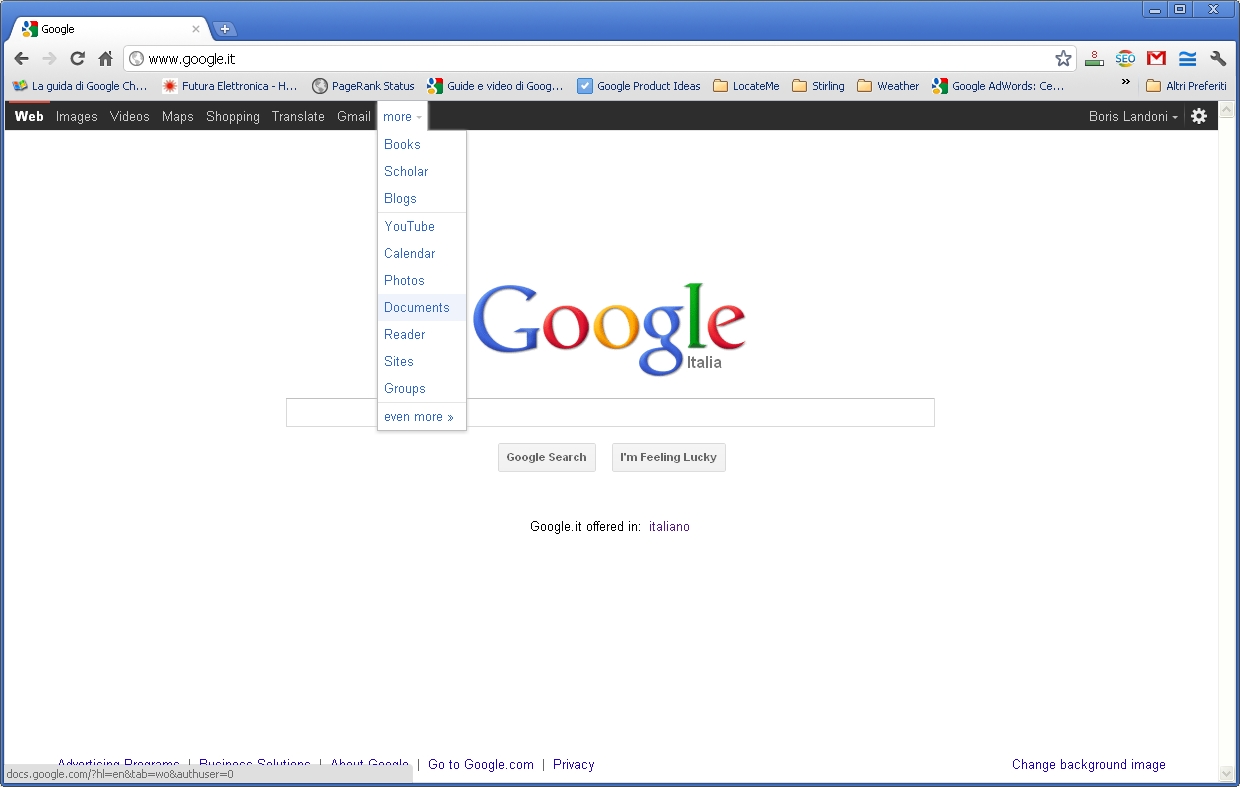
2° – Select “Create new” -> “Form” from Google Docs Menu:

3° – Create the form with TEXT type box. You can insert how many box you need. Give a name to the Form and to Question (the Questions names will be the columns names):

4° – Click “Done”. You created the Form. In the URL you can see the formkey. In my case is formkey=dDBMdUx3TmQ5Y2xvX2Z0V183UVp2U0E6MQ Take note of this key. We will use it on the Arduino sketch.

5° – Normaly the TEXT box (Data 1 and Data 2 in this example) are named entry.0.single and entry.1.single …. etc. But the name can change if you modify the basic structure. So the best way is explore the HTML code to check this.

6° – I use Google Chrome to do this, but similar procedure is with Firefox or IE. The code show the BOX name. Take note of this name.

7° – In my case the name are entry.0.single for Data 1 and entry.2.single for Data 2. To send data to the Form we must use this sintax:
https://spreadsheets.google.com/formResponse?formkey=YOUR FORM KEY &ifq& YOUR ENTRY =THE VALUE TO STORE &submit=Submit
For Example:
https://spreadsheets.google.com/formResponse?formkey=dDBMdUx3TmQ5Y2xvX2Z0V183UVp2U0E6MQ &ifq&entry.0.single=Boris&entry.2.single=Landoni&submit=Submit
The result must be:

8° – The data are copied in the Google Spreadsheet. This is my sheet link https://spreadsheets.google.com/spreadsheet/ccc?key=0As0sZjJOmuxUdDBMdUx3TmQ5Y2xvX2Z0V183UVp2U0E&hl=en_US.

9° – Now we must upload data with Arduino. We use the POST method to send data to the Form. And the code become very simple.
/* Arduino to Google Docs
 created 2011

This example code is in the public domain.

http://www.open-electronics.org
http://www.futurashop.it

https://spreadsheets.google.com/formResponse?formkey=dDBMdUx3TmQ5Y2xvX2Z0V183UVp2U0E6MQ &ifq&entry.0.single=Boris&entry.2.single=Landoni&submit=Submit
Original from http://goodsite.cocolog-nifty.com/uessay/2010/07/arduinogoogle-d.html
Modified by John Missikos 11/6/11
Modified by Andrea Fainozzi 30/6/11
Modified by Boris Landoni 8/7/11

*/

#include
#include

char formkey[] = "dDBMdUx3TmQ5Y2xvX2Z0V183UVp2U0E6MQ"; //Replace with your Key
byte mac[] = { 0x90,0xA2,0xDA,0x00,0x55,0x8D};  //Replace with your Ethernet shield MAC
byte ip[] = { 192,168,0,109};  //The Arduino device IP address
byte subnet[] = { 255,255,255,0};
byte gateway[] = { 192,168,0,254};
byte server[] = { 209,85,229,101 }; // Google IP
Client client(server, 80);

void setup()
{
  Serial.begin(9600);
  Ethernet.begin(mac, ip , gateway , subnet);
  delay(1000);
  Serial.println("connecting...");
}

void loop(){
  String data;
  data+="";
  data+="entry.0.single=";
  data+=analogRead(A0);
  data+="&entry.2.single=";
  data+=analogRead(A1);
  data+="&submit=Submit";

  if (client.connect()) {
    Serial.println("connected");

    client.print("POST /formResponse?formkey=");
    client.print(formkey);
    client.println("&ifq HTTP/1.1");
    client.println("Host: spreadsheets.google.com");
    client.println("Content-Type: application/x-www-form-urlencoded");
    client.println("Connection: close");
    client.print("Content-Length: ");
    client.println(data.length());
    client.println();
    client.print(data);
    client.println();

    Serial.print("POST /formResponse?formkey=");
    Serial.print(formkey);
    Serial.println("&ifq HTTP/1.1");
    Serial.println("Host: spreadsheets.google.com");
    Serial.println("Content-Type: application/x-www-form-urlencoded");
    Serial.println("Connection: close");
    Serial.print("Content-Length: ");
    Serial.println(data.length());
    Serial.println();
    Serial.print(data);
    Serial.println();

  }
  delay(1000);
  if (!client.connected()) {
    Serial.println();
    Serial.println("disconnecting.");
    client.stop();
  }

  delay(10000);

}
This code publishes on the Google Spreadsheet the value of analog input A0 and A1.
The application could be very different. If you have the data on Google you can draw grafics, download data on you PC, share this data with your friends…
If you have some idea…. Send me your projects and I’ll try to satisfy your requirement.

[…] to send data from Arduino to Google Docs Spreadsheet – [Link] Tags: Arduino, Google, Pachube, Spreadsheet, Wifi Filed in Mcu | 1 views No Comments […]
Hacking URLs like this is a pretty bad idea – they are likely to change at some point. Why not use the Spreadsheets API?
http://code.google.com/apis/spreadsheets/
James. Be great if you could develop a tutorial similarly with Spreadsheets API.
[…] quite a few ways to get data from your Arduino onto the internet, but I especially like this one. Open Electronics has a nice tutorial on using your Arduino to send data to be saved into a Google Spreadsheet. The trick is to use […]
@ James. Use the API with Arduino it’s not simple. You have to be logged and, if I not mistaken, is required a secure connection. And with Arduino is not so simple do it.
I hope that someone can me contradict.
@Bloink Thank you :-) give me a feedback when you try it.
Nice tutorial. @James if there was currently a way to use DNS with the Arduino Ethernet stack then it would be easier to not hack the URL, but for now it looks like this is the best option.
How would the code differ if instead of using an ethernet shield, you send the data through the serial (usb) port?
Nevermind, I got it. I have the Arduino read the data from via OneWire and then have Processing read the data from the serial port and post directly to a google spreadsheet without the form.
Thanks though for getting me started!!!!
I am just getting started with Arduino and have minimal programming experience.
This has been a great start and is almost exaclty what I need for my project. I am having a hard time finding exactly what I need on the google spreadsheets API info pages.
I’m trying make each entry overwrite the same cells everytime rather then add new lines.
How do i accomplish this. Any help would be greatly appreciated.
How would I need to change this if I am using a WIFI shield instead of an ethernet shield?
Thanks!
Hi, the system is the same. We developed a new WiFi shield like the Asynclab Shield. ASAP I’ll public a example
[…] How to send data from Arduino to Google Docs Spreadsheet A very interesting feature of Arduino is the great avalaibility of library that make the developer work very simple and fast. Make a Web Server, a Web Client or post a Tweet haven't difficulty. Source: http://www.open-electronics.org […]
[…] How to send data from Arduino to Google Docs Spreadsheet A very interesting feature of Arduino is the great avalaibility of library that make the developer work very simple and fast. Make a Web Server, a Web Client or post a Tweet haven't difficulty. Source: http://www.open-electronics.org […]
Cool hack indeed. Google’s API is tough, even provided client python/java libraries are so. I’ve used this one, called gspread for my python needs. I know it’s not an option for Arduino for now, but if you glance at the code it’s pretty easy to figure out how the auth process on and all data update methods are working.
Half of what I was looking for, I need to be able to read data out of a google doc back to the Arduino too, How do you do that?
Print.h:83: error: ‘const class Printable’ has no member named ‘printTo
Some one help
[…] mi-au picat ochii pe un exemplu simpatic care demonstreaza cum poti sa folosesti un Google Form ca sa trimiti date din Arduino direct […]
Hi,
Is there a way to achieve this using a GSM shield?
Thanks
Tony
Hi, you can use the code for GPRS function http://code.google.com/p/gsm-shield-arduino/downloads/list
ASAP I publish a project with this function.
Hi.
I posted data from wifi sheild to google spreadsheet successful.
But i don’t know ,how to get data from google spreadsheet to arduino wifi.
Everybody can help me!!!
Thanks.
hey which wifi shield you used ….???
This one
http://www.open-electronics.org/arduino-wifi-shield/
Do you know how I might sent a non-integer value? Like “68.6”? I suppose I can just send the integer and fractional values separately and then combine in the spreadsheet
The problem is that you can’t send the dot point with get method.
[…] dettagliato e spiegato bene, anche se è una traduzione di un articolo pubblicato 3 mesi prima How to send data from Arduino to Google Docs Spreadsheet. Io allo sketch ho apportato alcune modifiche di miglioramento, ma quelli pubblicati vanno […]
Thank you for the great tutorial which helped me to upload weather data to Google drive. Yesterday I noticed the upload stopped. :-(
Obviously Google changed the ip-adress, replacing it with 173.194.66.113 got the scetch working again. :-)
Is that ip unique to your spreadsheet?
Hello,
Great guide found it a while ago, but I have just battled with my WiFly to get it connected, and now i came to use this to send information to google docs and they have changed google docs so it no longer works. Have you or anyone reading this had success with it since the change?
I found that they changed the system, but I have not studied the new method ..
But If you can find a new method, that would be brilliant :) as I am not too sure if Google will keep this format much longer..
Do you know if the old forms will delete or keep them in parallel?
I am a newbie in this battles, but as I have seen for some IoT servers, for data sending use a PUT request instead of POST. Given that PUT is safe, and that the new forms are added security, there may be relationship. If so, can serve as an example: http://cosm.com/docs/v2/feed/update.html
http://puravidaapps.com/taifunGS.php#new
was trying something with the above link for the new form format.. with no success.. someone else give it a shot?
http://michaelwalsh.org/blog/2013/02/05/work-around-for-google-forms-problem/
found this, it will do for the while… cheers to the guy who discovered it!
Thanks for this wonderful guide again..
Thank you Mathias.
Good work, thanks to share!!
Thanks for this article, I being a big help on a project I have in mind, but with the new forms of google, I can not send data, only with direct URL method. Do you know if you still can do this with the new forms, or have blocked this option?
As write Mathias in
http://michaelwalsh.org/blog/2013/02/05/work-around-for-google-forms-problem/
“Legacy Google Forms are still available IF you start creating the form by opening a SpreadSheet first. Once the spreadsheet is open, select “Create a legacy Form” from the “Tools” menu. The form editor and published URL will be the same as those that had worked prior to the Google Forms update.”
Hi Boris.
I’m using IDE 1.0.3 and seems Ethernet.h updated and I have to change a bit your sketch to compile it. If you ineresting… see my comments after // ——>
may-be it can help others.
#include // ——> for some reason in published scetch missing
#include // ——> for some reason in scetch missing
char formkey[] = “dFA3aGdKUmtoaGtQYmtXTskippedMQ”;
byte mac[] = { 0x90,0xA2,0xDA,0x00,0x55,0x8D};
byte ip[] = { 192,168,1,99};
byte subnet[] = { 255,255,255,0};
byte gateway[] = { 192,168,1,1};
byte dnserv[] = { 192,168,1,1}; // ——> have to add this line
byte server[] = { 173,194,41,136 };
EthernetClient client; // ——> have to remove (server, 80)
void setup()
{
Serial.begin(9600);
Ethernet.begin(mac, ip ,dnserv, gateway , subnet); // ——> add “dnserv,”
// otherwise arguments order is wrong
delay(1000);
Serial.println( Ethernet.localIP()); // ——> just to check
Serial.println( Ethernet.subnetMask()); // ——> just to check
Serial.println( Ethernet.gatewayIP()); // ——> just to check
Serial.println( Ethernet.dnsServerIP()); // ——> just to check
Serial.println(“connecting…”);
}
void loop(){
String data;
data+=””;
data+=”entry.0.single=”;
data+=10;
data+=”&entry.1.single=”;
data+=20;
data+=”&entry.2.single=”;
data+=-5;
data+=”&submit=Submit”;
if (client.connect(server, 80)) { // ——> have to add “server, 80”
Serial.println(“connected”);
…..
Thanks.
Strange….when i type it was ok….but in my post it look wrong….probably som bug in post comments script….
#include // SPI should be capital
#include // E should be capital
the whole URLs are changed, i can’t even find the formkey :/
See http://michaelwalsh.org/blog/2013/02/05/work-around-for-google-forms-problem/
URLS are changed again. How can i get formkey?
[…] dettagliato e spiegato bene, anche se è una traduzione di un articolo pubblicato 3 mesi prima How to send data from Arduino to Google Docs Spreadsheet. Io allo sketch ho apportato alcune modifiche di miglioramento, ma quelli pubblicati vanno […]
Hi, the sketch presented doesn’t work with me. I get an error on
Client client(server, 80);
“The class Client is now named EthernetClient”
What libraries should be included, I only used Ethernet.h
[…] A very interesting feature of Arduino is the great avalaibility of library that make the developer work very simple and fast. Make a Web Server, a Web Client or post a Tweet haven't difficulty. […]
is this possible via pc serial arduino connection also?
What do you mean?
Recommeneded websites
Here you’ll find some sites that we think you’ll appreciate, just click the links over
i got one question .
is it it work with arduino by connecting cable to laptop and use laptop upload data
or
can use ethernetshield as gateway to upload the data through router?
It use ethernet shield
where to get google IP?
use PING function
Check this out
Here are some of the sites we recommend for our visitors
This is after the update, But still can Use the submit button yet.
https://docs.google.com/forms/d/(Your_Key)/viewform?=&entry.591200773=FirstField&entry.623380546=SecondField
Good day friend, I like your program but I need to read data from the table and make the Arduino make decisions for these data, for example an LED light
you know how to do this?
Hi, interesting project. At the moment we haven’t a solution, but I’ll study it ;-)
Hi Boris
Can I use Arduino yun instead in the project?
Yes but you have to change all the code….
Hi there, I’m also trying to use this code with the Yun and running into problems, have either of you been able to adapt the code?
would be great if you could let me know. thanks a lot
Ben
I am trying to do do project with Arduino uno, sensor, LED and WiFi shield. I am taking analog input of sensor data in Arduino uno. The basic program lit up an LED if the sensor value exceeds a threshold level. And this program is working fine. Now I want simultaneously to upload the input data to Google spreadsheet with the help of WiFi shield. After mounting the WiFi shield the basic functionality is even not getting executed. Hence I am wondering whether accessing two hardware level components simultaneously is supported by Arduino micro-controller or not?
If the two shield are using the same pins probably doesn’t work.
Wonderful.. Thanks a lot
Can any one explain me how to upload data to new google spreadsheet (which is different from the one explained in this section)
Hey, i am doing a project and i want to send data logged from my Gboard pro to the google spreadsheet. i am wondering if you managed to solve the problem and can help me out. I am currently sending data to my google spreadsheet via pushingbox.com from my board but i am only limited to 1000 requests a day and for analysis purpose i need to send more then that.
Thanks! This was great! I was able to build a charging dashboard for my electric vehicle. http://www.rainorshine.bike/tessa
Mine is not connecting. It keeps on giving disconnecting on the serial monitor.
Does it work with Arduino Yun too? I was trying to modify the code but I just don’t know where to start……..Please help
We don’t try, but probably yes
Hello Boris and thanks for sharing this useful approach for logging. I am blocked at getting the form key: Could you please explain how exactly i can find the key and if the url you gave (below) is the good one
https://spreadsheets.google.com/formResponse?formkey= &ifq&=&=&submit=Submit
Thanks in advance for your time
anny luck? I am looking at the same problem
Not so far, another approach would be sparkfun logger. Didn’t try it yet
In my project i have to send data of ultrasonic sensor output to spreadsheet using arduino uno and wifi.how this can be done.if any one have code for this then pleasr share it.
It doesn’t works, could anyone help me please?
Any chance this will ever be updated with fresh information? Everything here is outdated. It is hard to follow and I have had no luck making it work.
Thanks
BorisLandoni
Hi, I have connected Arduino with Ethernet shield. As per your instruction I have created the form and implemented the key to it into the code. Everything seems connected successful. But I couldn’t see the updated data in google sheet. Please help in this.
This is a very old post.
In the comments some people solve the problems
Hi! I know this is very old, but did you solve the problem? I have the same problem here.
@madinanazar:disqus : Thanks for getting back Madina, I have solved this issues.
Can you help me with it? What was the problem?
I used SFG software to integrate the data from the file. Instead of using the above method.
[…] How send data from Arduino to Google … – In this post I want explain the best way to send data on Google Spreadsheet. […]
ôi 15:50
i want to creat 1 google form
to send data from sim 900 to google
but im not look formkey
this is my https://docs.google.com/forms/d/e/1FAIpQLSe7iAyEnx5QcFw0ylepEiZ5AtJ4ACl-rFioqnPU48TE7w5gJA/viewform
can u help me?
[…] How send data from Arduino to Google Docs Spreadsheet … – I am trying to do do project with Arduino uno, sensor, LED and WiFi shield. I am taking analog input of sensor data in Arduino uno. The basic program lit up an LED if … […]
i want to send arduino sensors value to google sheet using arduino uno and sim800L