

Patel Sohil Sanjaybhai wants to partecipate to our iniziative “TiDiGino Contest”, sent us his application with Arduino to demonstrate his skills in this field: an Arduino Typewriter.
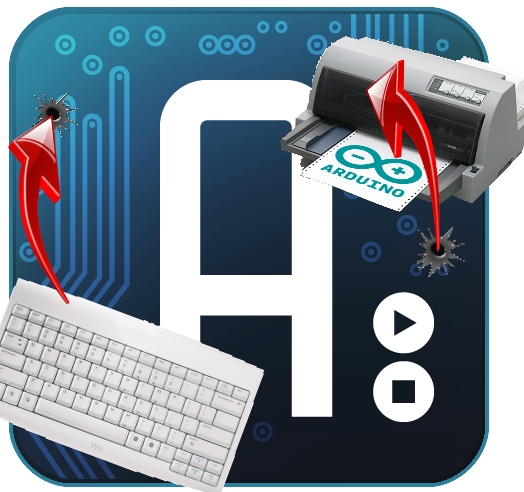
This project shows how to recycle an old PS2 keyboard and a dot matrix printer (DB25) to make a typewriter.
How works:
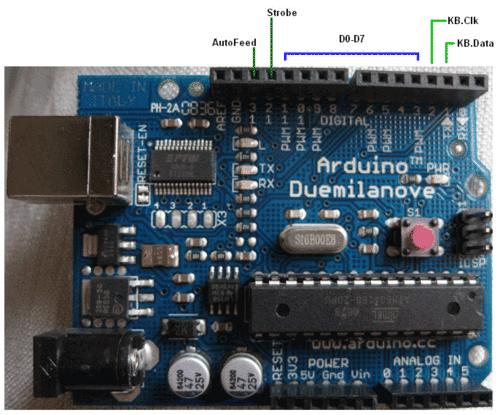
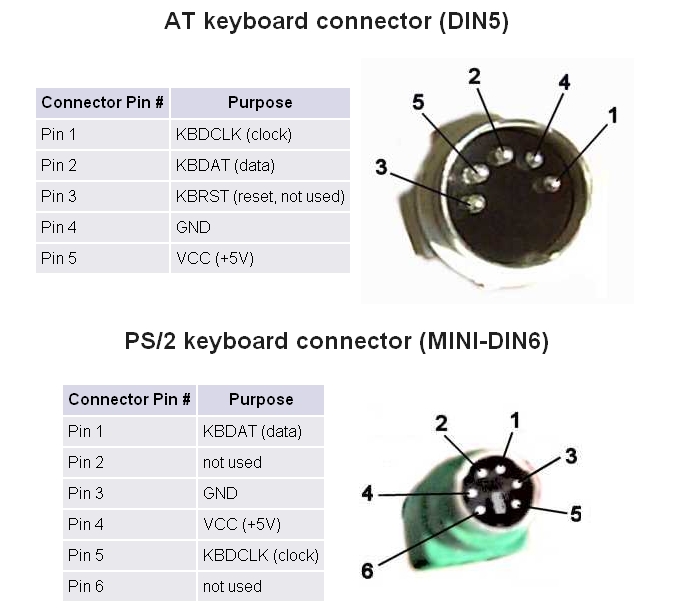
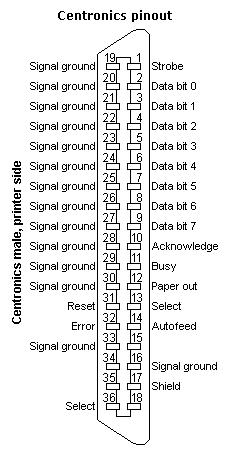
The idea is connect the keyboard to the printer with a basic and cheap interface, we have used Arduino because is a fast development board for this kind of projects. The board read the keyboard signals (use a data/clock system) and transform this info about the character to the printer.
Code:
#include <PS2Keyboard.h>
#include <string.h>
#include <stdio.h>

#define KBD_CLK_PIN 3
#define KBD_DATA_PIN 2
#define d0 4
#define d1 5
#define d2 6
#define d3 7
#define d4 8
#define d5 9
#define d6 10
#define d7 11
#define strobe 12
#define autofd 13

PS2Keyboard keyboard;

int caracter = 0;
byte key=0;
void setup()
{
  keyboard.begin(KBD_DATA_PIN);
  pinMode(d0, OUTPUT);
  pinMode(d1, OUTPUT);
  pinMode(d2, OUTPUT);
  pinMode(d3, OUTPUT);
  pinMode(d4, OUTPUT);
  pinMode(d5, OUTPUT);
  pinMode(d6, OUTPUT);
  pinMode(d7, OUTPUT);
  pinMode(strobe, OUTPUT);
  pinMode(autofd, OUTPUT);
  digitalWrite(autofd,HIGH);
  digitalWrite(strobe,HIGH);
  Serial.begin(9600);
  delay(1000);
}

void transmit(int x)
{
   if (x >= 128)
   {
    x = x - 128;
    digitalWrite(d7,HIGH);
  }
  else
  {
    digitalWrite(d7,LOW);
  }
  if (x >= 64)
  {
    x = x - 64;
    digitalWrite(d6,HIGH);
  }
  else
  {
    digitalWrite(d6,LOW);
  }
  if (x >= 32)
  {
    x = x - 32;
    digitalWrite(d5,HIGH);
  }
  else
  {
    digitalWrite(d5,LOW);
  }
  if (x >= 16)
  {
    x = x - 16;
    digitalWrite(d4,HIGH);
  }
  else
  {
    digitalWrite(d4,LOW);
  }
  if (x >=  8  )
  {
    x = x - 8;
    digitalWrite(d3,HIGH);
  }
  else
  {
    digitalWrite(d3,LOW);
  }
  if (x >= 4)
  {
    x = x - 4;
    digitalWrite(d2,HIGH);
  }
  else
  {
    digitalWrite(d2,LOW);
  }
  if (x >= 2)
  {
    x = x - 2;
    digitalWrite(d1,HIGH);
  }
  else
  {
    digitalWrite(d1,LOW);
  }
  if (x >= 1)
  {
    digitalWrite(d0,HIGH);
  }
  else
  {
    digitalWrite(d0,LOW);
  }
  digitalWrite(strobe,LOW);
  delayMicroseconds(2);
  digitalWrite(strobe,HIGH);
}

void loop()
{
  if(keyboard.available())
  {
    byte c = keyboard.read();
    Serial.println(c);
   // byte c=Serial.read();
    ascii(c);
   if(c == 13)
   {
     Serial.println(key);
     transmit(10);
   }
   else
   {
     Serial.println(key,HEX);
     transmit(key);
   }

   // Serial.println(c,HEX);

    }

}

void ascii(byte x)
{
  switch(x)
  {
    case 0x1c:
    {
      key=0x41;
      break;
    }
    case 0x32:
    {
      key=0x42;
      break;
    }
    case 0x21:
    {
      key=0x43;
      break;
    }
    case 0x23:
    {
      key=0x44;
      break;
    }
    case 0x24:
    {
      key=0x45;
      break;
    }
    case 0x2B:
    {
      key=0x46;
      break;
    }
    case 0x34:
    {
      key=0x47;
      break;
    }
    case 0x33:
    {
      key=0x48;
      break;
    }
    case 0x43:
    {
      key=0x49;
      break;
    }
    case 0x3B:
    {
      key=0x4A;
      break;
    }
    case 0x42:
    {
      key=0x4B;
      break;
    }
    case 0x4B:
    {
      key=0x4C;
      break;
    }
    case 0x3A:
    {
      key=0x4D;
      break;
    }
    case 0x31:
    {
      key=0x4E;
      break;
    }
    case 0x44:
    {
      key=0x4F;
      break;
    }
    case 0x4D:
    {
      key=0x50;
      break;
    }
    case 0x15:
    {
      key=0x51;
      break;
    }
    case 0x2D:
    {
      key=0x52;
      break;
    }
    case 0x1B:
    {
      key=0x53;
      break;
    }
    case 0x2C:
    {
      key=0x54;
      break;
    }
    case 0x3C:
    {
      key=0x55;
      break;
    }
    case 0x2A:
    {
      key=0x56;
      break;
    }
    case 0x1D:
    {
      key=0x57;
      break;
    }
    case 0x22:
    {
      key=0x58;
      break;
    }
    case 0x35:
    {
      key=0x59;
      break;
    }
    case 0x1A:
    {
      key=0x5A;
      break;
    }
    case 0x0D:
    {
      key=0x09;
      break;
    }
    case 0x29:
    {
      key=0x20;
      break;
    }
    default:
    {
    }
  }
}

 |
Library |

are you bored
Something like this is actually very useful when you’re trying to write something like a thesis. That and ritalin.