


Maybe it’s too late to present an Halloween project with a lot of function, so we decide to develope a simple application to show how controll a mandible of a skull.
[iframe_loader src=”http://www.youtube.com/embed/jsKBcH7xZBg?hl=it&fs=1″ height=”349″ width=”425″ ]
In this project the skull speaks and moves the mandible according to the sound level.
An Arduino analyzes the level sound of a audio source and drives a servo motor connected to the mandible.
All very simple.

The video show how it works.
[iframe_loader src=”http://www.youtube.com/embed/1i28teQTdpQ?hl=it&fs=1″ height=”349″ width=”425″ ]
The sketch:
/* Skull
 created 2011
 by Boris Landoni

 This example code is in the public domain.

http://www.open-electronics.org
http://www.futurashop.it
*/

#include <Servo.h>

Servo myservo;  // create servo object to control a servo

int potpin = 0;  // analog pin used to connect the potentiometer
int val;    // variable to read the value from the analog pin

void setup()
{
  myservo.attach(9);  // attaches the servo on pin 9 to the servo object
}

void loop()
{
  val = (analogRead(potpin)*3);            // reads the value of the potentiometer
  val = map(val, 0, 1023, 50, 0);     // scale it to use it with the servo
  myservo.write(val);                  // sets the servo position according to the scaled value
  delay(15);                           // waits for the servo to get there
}
The schemtaics shows how we connect the servo to Arduino.

 Download the Fritzing file
Inside the skull we use an old PCB to fix the servo (you can use what you want).
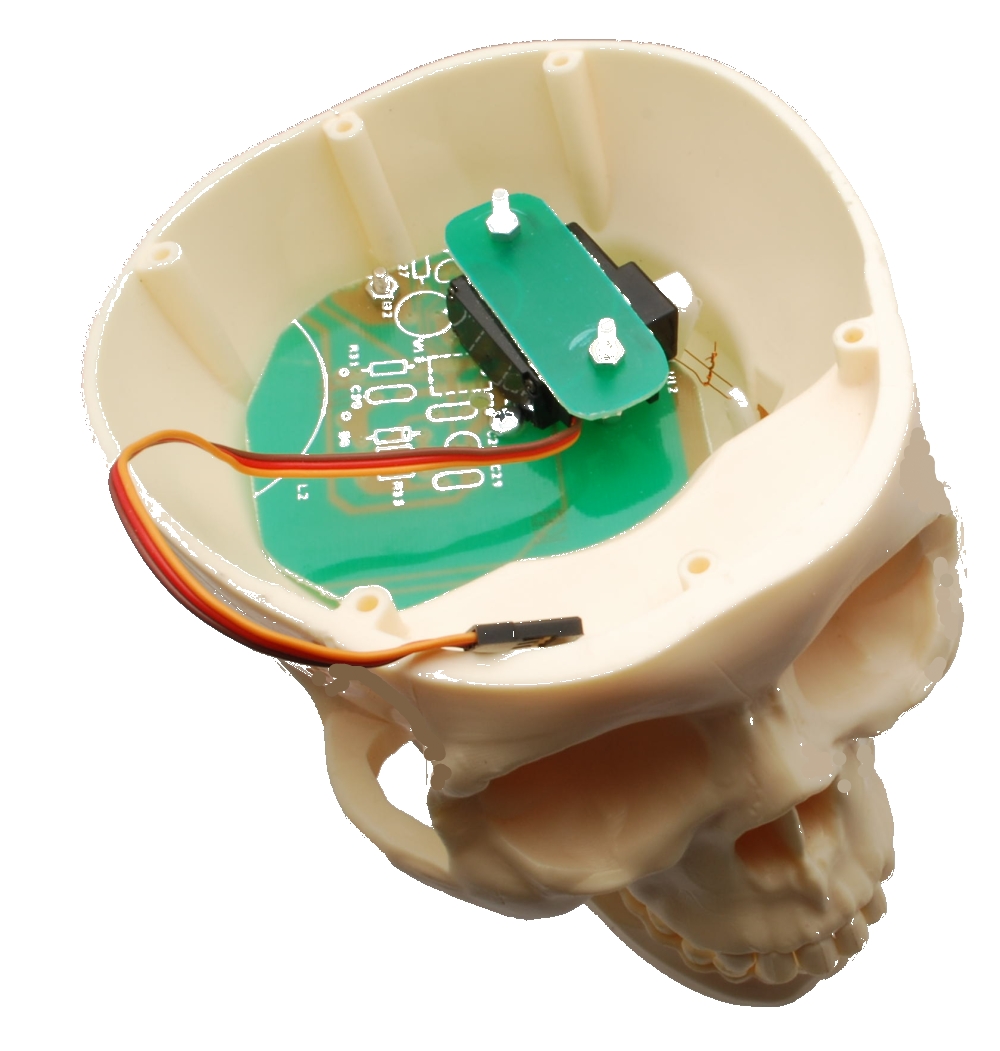
This project wants to be a start point for yours ideas….
Have a good work


[…] If you haven’t taken the time to put your decorations together it’s time to get a move on. With Halloween just around the corner big elaborate displays are pretty much out of the question, but [Boris] and the team over at Open Electronics have a simple project that’s sure to be a hit with the Trick or Treaters. […]
[…] Si vous êtes bricoleur et amateur de gadget, vous pourrez impressionner vos visiteurs par un crâne articulé commandé par une électronique Open Source Arduino (cf. Open Electronics). […]
[…] If you haven’t taken the time to put your decorations together it’s time to get a move on. With Halloween just around the corner big elaborate displays are pretty much out of the question, but [Boris] and the team over at Open Electronics have a simple project that’s sure to be a hit with the Trick or Treaters. […]
how is your servo connected to the jaw? can you mount the servo the
same as scary terry does, on his website http://www.scary-terry.com/buckyservo/buckyservo.htm ?
We used a simple cord connected to the servo.
You could use the Terry System of course.
hi, i’d like to see a picture of the actual circuit too.
Now there isn’t an actual circuit…. It’s an old project…
Can you please confirm the capacitor used…. I can not find a 1µF 6.3v electrolytic
You can use also a 1µF 100V. the 6.3V is the minimum value.
I followed the schematic provided in the Fritzing file and the circuit works very well. BTW – the Fritizing file contains 3 different views; one for breadboard, one for schematic, and one for PBC. All 3 views contain information about the components, namely the capacitor, the resistor, the servo motor, and the Arduino board. I used a breadboard first. The only difficulty I ran across was at first the servo only seemed to minimally respond to the audio input (I was playing a Halloween speech-based mp3) but I finally figured out that my laptop’s volume output was turned down low. Once I turned the volume up the servo reacted more robustly. I already have a skull with a hinged jaw from last Halloween and plan to incorporate this circuit into my existing design. The servo reacts very quickly to sound fluctuations and I can see it mimicking speech movement in synch with the audio track. Nice simple design! Keep in mind this circuit will also react to background music, not just speech – so you may want to mix your sound affects with the voice/speech aspects recorded on a separate track. Then you have the option of amplifying the music separately while routing the speech through this circuit.
What does the circuit do? Seems to me that it’s a parallel RC circuit, when it seems you’d want a lowpass filter which should have the resistor and capacitor in series?
Arduino listen the music level and move the servo
Hi guys. Sharing our techie Halloween craft for kids http://albertomorales.eu/kids-halloween-and-arduino/
It’s an Arduino powered POV display. I hope it’ll be helpful for somebody. Cheers. Alberto Morales.
[…] Scary Skull […]
[…] 詳細步驟看此:open-electronics […]
This is a silly question, but I assume you used some type of splitter for the audio cable with one end going to the arduino and the other going to amplified speakers?
Would it be alright to use your skull blueprints and code on an Instructable I am making? It’s based on how to make a full size animatronic character and your instructions would be perfect for part of the head.
what if i wanted to do 3 skulls… would i be able to use 1 Arduino with 3 servos with all skulls having a different movement interval
i git thje system to work but the servo closes the mouth instead of opening it. how fix?
You have to change the code
[…] Scary Skull […]
What size capacitor and what size resistor are you using?
bcshgxpn
vfcwsjgq
First off I’m new to Arduino. I built the circuit and am testing it out and adjusting some of the parameters. The servo runs correctly when the Arduino board is connected to my laptop via the USB. When I disconnect the USB it runs erratically. Is it supposed to work this way?